


正確な状態を記載
製品ページは、状態、目に見える詳細、付属品、およびモデル固有の互換性に関する注意に関する真実の情報源です。
コンディションガイドさらに[金額]以上お支払いいただくと送料無料になります
受取状況を読み込めませんでした
チェックアウト後、Reboot Hub は正確な注文を確認し、実際の商品をリストと照合し、該当する場合は証拠を文書化し、梱包ビデオを記録し、追跡を共有します。 【2】ご注文と納品のタイミング
Reboot Hub を選ぶ理由
中古 の国際的な購入を難しくする質問を減らします。商品が何であるか、外観、何が含まれているか、何をチェックしたか、誰が梱包したかなどです。
製品ページは、状態、目に見える詳細、付属品、およびモデル固有の互換性に関する注意に関する真実の情報源です。
コンディションガイド対象となる 中古 製品には、製品ページに示されている保証条件が含まれていますが、除外事項は明確に記載されています。
ポリシーの表示当社の技術的背景は、発送前の実際の検査、修理リスクの検討、互換性チェックをサポートします。
当社の認証私たちはこれらの注文をドロップシッピングしません。私たち自身のチームが商品をレビューし、保護を準備し、梱包し、発送を記録します。
当社の基準梱包証明
この実際の梱包記録は、Reboot Hub が高額の RC Pro 2 注文をどのように処理するかを示しています。同じ慎重なプロセスが当社の機器全体に適用されます。リストのレビュー、適切な追加保護、緩衝材、最終シール、追跡可能な発送です。
製品の証拠
注文の背後にある正確な単位、記録された状態、証拠と保護を理解します。
検査報告書内の写真は、再利用サンプル品ではなく、ご注文に応じて準備された実際のユニットを示しています。 【3】状態・点検記録
状態グレードと検査記録は、承認され発送の準備ができているものと同じユニットを示しています。
供給されるユニットについて、利用可能な機能のチェック、診断結果、注意事項、およびサポートビデオが公開されています。
梱包記録には、承認された商品が発送前にこの注文に対してどのように保護され、緩衝され、密封されているかが文書化されています。
発送追跡は発送後に共有されるため、配達記録は確認された注文に関連付けられたままになります。
正確な製品情報
選択した製品ページ、バリエーション、および書面による確認は、状態、互換性、付属品、および保証条件についての信頼できる情報源となります。
発送前に、選択されたモデル、コントローラー、バッテリー、充電器、およびアクセサリーの世代に対して互換性がチェックされます。
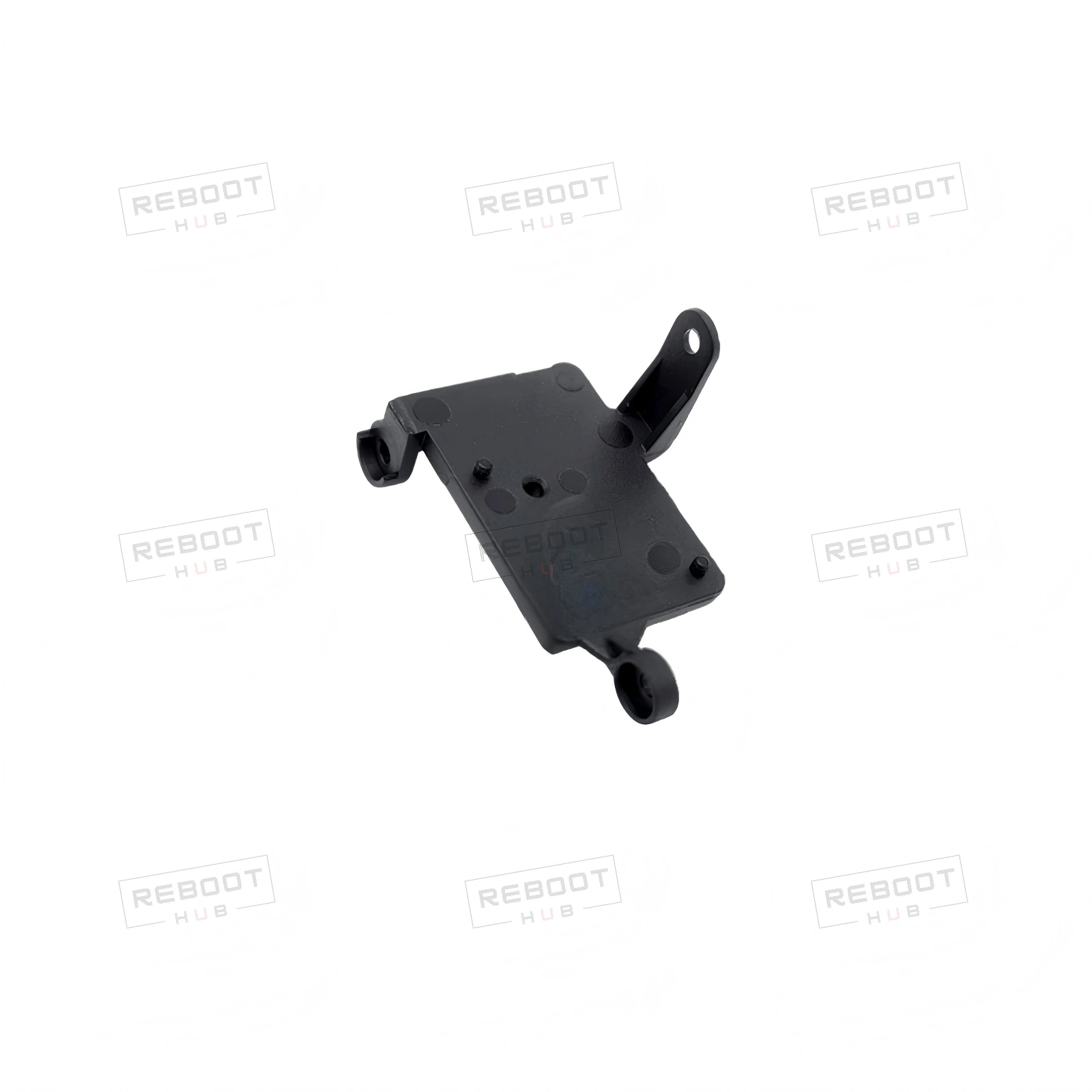
Holds the button board in place for DJI Goggles Integra.
DJI Goggles Integra Button Board Bracket - OEM-pulled · PRODUCT KNOWLEDGE
Product summary: DJI Goggles Integra Button Board Bracket - OEM-pulled from Reboot Hub. This bracket secures the button board within the DJI Goggles Integra. It features precise mounting holes and a sturdy design to ensure proper alignment and stability.
Product category
Spare PartsCurrent Shopify product classification.Listing condition
As listedExact condition and cosmetic grade are governed by this listing and selected variant.Available selection
Single listed configurationThe selected variant and listing photographs control included items.Core function
Holds the button board in place for DJI Goggles Integra.Based on the current product listing.Inspection focus
Condition, core function, compatibility and included piecesReboot Hub review scope before dispatch.Written coverage
Listing-specific written termsCheck the warranty, shipping and return terms shown on this listing before purchase.海外バイヤーチェック
注文する前に、モデルのバージョン、目的地の無線要件、アクティベーション、および現地の飛行ルールを確認してください。
DJI 地域互換性ガイドを読む製品の互換性について
| アイテム | ステータス 【4】知っておきたいこと | 知っておくべきこと |
|---|---|---|
| Exact host model | Exact match required | Match DJI Goggles Integra Button Board Bracket to the full donor and host model, generation and part number before ordering. |
| Hardware revision and position | Confirm | Confirm connector layout, board or mechanical revision, left/right position and subtype (structural-mechanical) from the listing photographs. |
| Installation scope and included pieces | Listing-specific | Confirm whether this listing includes only the pulled part or also its cables, screws, brackets, adhesive and related hardware. |
| Aircraft transmission generation | Confirm | Match the goggles to the exact aircraft video-transmission generation and current DJI compatibility list. |
| Controller or motion controller | Confirm | The compatible control path depends on the aircraft, goggles and firmware combination. |
| Firmware alignment | Required | Update the aircraft, goggles and controller together before pairing or judging compatibility. |
選択されたパッケージ = 真実の情報源
The selected variant, its photographs and Reboot Hub written confirmation determine the exact included pieces.
選択したバリアント、その画像、および Reboot Hub 検査記録により、正確な付属品が決まります。
Match DJI Goggles Integra Button Board Bracket, its hardware revision and physical position to the intended equipment before disassembly.
Compare the exact item with listing photographs; check pins, flex cables, mounts, sensors and contact surfaces for damage.
Use the model-specific service procedure, ESD precautions, correct tools and documented fastener sequence; specialist installation may be required.
Reassemble only after checking fitment, then verify the affected function and complete any documented calibration before operational use.
Stop installation and re-check the exact host model, hardware revision, side, position and connector orientation.
Inspect every related connector and flex cable, then verify installation, firmware and required calibration before judging the replacement part.
Record the exact warning, power down safely and review the model-specific service path; do not force calibration or operation.
Stop work to prevent secondary damage and document the item, connector and mounting area before seeking technical support.
文書化された製品証拠
製品に関するご質問
部品と機器の正確なフィット感
部品、コントローラー、カメラ、ジンバル、アクセサリについては、Reboot Hub が注文に利用可能な情報と照らし合わせて、正確な品目、部品の同一性、目に見える状態、および既知の互換性をチェックします。コンポーネントがモデルまたはリビジョン固有である場合は、支払い前に適合性を確認するよう依頼してください。
ガイド、サポート、学習

Continue from the purchase decision into one organized model reference covering compatibility, setup, parts context, common failure points and supporting DJI documents.
ガイドを読む
Use a practical aircraft, battery, propeller, controller, Home Point, and environment check before deciding to launch.
ガイドを読む
Check the battery, charger, cable, temperature, and indicator behavior before treating a charging problem as a failed battery.
ガイドを読む