


DJI Mini 5 Pro Takeoff Button - OEM-pulled
- $17.13
- Stückpreis
- pro

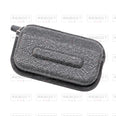
DJI Mini 5 Pro Takeoff Button is an original OEM-pulled repair part. The image shows a small moulded control piece with an outer rim and raised features. Verify the original mounting point and whether the package includes an actuator or an electrical switch.
What does the DJI Mini 5 Pro Takeoff Button do?
Takeoff Button is the catalogue label for this part. DJI describes aircraft power and app-based automatic takeoff separately. Check the original installed part and identify its function before selecting a replacement. For reference, the DJI Mini 5 Pro (2025) weighs 249.9 g at takeoff. The listing shows 1 original photograph of this exact part.
Common reasons owners replace it
- Broken, cracked or lost during a crash or an earlier repair
- Worn clips or mounting points that no longer hold it firmly
- Restoring the original fit and finish after a gimbal or body repair
Related DJI Mini 5 Pro parts
See all DJI Mini 5 Pro parts. The DJI Mini 5 Pro repair guide covers teardown order and checks.
Confirm the part before ordering
Compare its contact arrangement, locating tabs and the underside shown in the photographs.
- Model
- DJI Mini 5 Pro
- Part
- Takeoff Button
- Condition
- OEM-pulled; original handling and removal marks may be present.
Supplied configuration
The supplied item follows the configuration named above and the verified original photographs. Photographs of alternate views do not mean additional units are included. The aircraft, tools, a complete control board or unpictured switch hardware are not included.
Dies ist ein Original-DJI OEM-pulled oder ein Service-Ersatzteil, kein Aftermarket-Ersatzteil und nicht als Neuware im Einzelhandel verpackt. Reboot Hub prüft den sichtbaren Zustand, den Sitz des Steckers und die modellspezifische Kompatibilität, bevor es zur Reparatur verwendet wird.
Bei korrekter Abstimmung mit dem aufgeführten DJI-Modell kompatibel. Bitte vergleichen Sie vor dem Kauf Modell, Stecker, Platinenversion und Teileposition. Wenn Sie unsicher sind, senden Sie uns vor der Bestellung ein Foto Ihres vorhandenen Teils.
Für ausführlichere Modellspezifikationen, Kompatibilitätshinweise und Vergleichskontext verwenden Sie die Reboot Hub Drone Wiki.
Abholverfügbarkeit konnte nicht geladen werden

GENAU PASSENDE TEILE UND AUSRÜSTUNG
Gleichen Sie vor der Bestellung das Teil, die Schnittstelle und den Zustand ab.
Bei Teilen, Controllern, Kameras, Gimbals und Zubehör prüft Reboot Hub den genauen Artikel, die Teileidentität, den sichtbaren Zustand und die bekannte Kompatibilität anhand der für die Bestellung verfügbaren Informationen. Bitten Sie uns, die Passform vor der Zahlung zu überprüfen, wenn eine Komponente modell- oder revisionsspezifisch ist.