


DJI Mini 5 Pro Takeoff Button - OEM-pulled
- $17.13
- Prix unitaire
- par

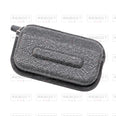
DJI Mini 5 Pro Takeoff Button is an original OEM-pulled repair part. The image shows a small moulded control piece with an outer rim and raised features. Verify the original mounting point and whether the package includes an actuator or an electrical switch.
What does the DJI Mini 5 Pro Takeoff Button do?
Takeoff Button is the catalogue label for this part. DJI describes aircraft power and app-based automatic takeoff separately. Check the original installed part and identify its function before selecting a replacement. For reference, the DJI Mini 5 Pro (2025) weighs 249.9 g at takeoff. The listing shows 1 original photograph of this exact part.
Common reasons owners replace it
- Broken, cracked or lost during a crash or an earlier repair
- Worn clips or mounting points that no longer hold it firmly
- Restoring the original fit and finish after a gimbal or body repair
Related DJI Mini 5 Pro parts
See all DJI Mini 5 Pro parts. The DJI Mini 5 Pro repair guide covers teardown order and checks.
Confirm the part before ordering
Compare its contact arrangement, locating tabs and the underside shown in the photographs.
- Model
- DJI Mini 5 Pro
- Part
- Takeoff Button
- Condition
- OEM-pulled; original handling and removal marks may be present.
Supplied configuration
The supplied item follows the configuration named above and the verified original photographs. Photographs of alternate views do not mean additional units are included. The aircraft, tools, a complete control board or unpictured switch hardware are not included.
Il s'agit d'une véritable pièce de rechange DJI OEM-pulled ou de service, et non d'un substitut de rechange et non emballée au détail comme neuve. Reboot Hub vérifie l'état visible, l'ajustement du connecteur et la compatibilité spécifique au modèle avant de le répertorier pour une utilisation en réparation.
Compatible avec le modèle DJI répertorié lorsqu'il est correctement adapté. Veuillez comparer le modèle, le connecteur, la version de la carte et la position de la pièce avant l'achat. Si vous n'êtes pas sûr, envoyez-nous une photo de votre pièce existante avant de commander.
Pour des spécifications de modèle plus approfondies, des notes de compatibilité et un contexte de comparaison, utilisez le Reboot Hub Drone Wiki.
Impossible de charger la disponibilité du ramassage

AJUSTEMENT EXACT DES PIÈCES ET DE L'ÉQUIPEMENT
Faites correspondre la pièce, l'interface et l'état avant de commander.
Pour les pièces, contrôleurs, caméras, cardans et accessoires, Reboot Hub vérifie l'article exact, l'identité de la pièce, l'état visible et la compatibilité connue par rapport aux informations disponibles pour la commande. Demandez-nous de vérifier l'ajustement avant le paiement lorsqu'un composant est spécifique à un modèle ou à une révision.