


Reboot Hub collection
Genuine OEM-Pulled DJI Spare Parts
2079 products available
Browse OEM-pulled DJI spare parts by model and component. Match the exact aircraft, headset or controller, then compare each listing’s photographs and supplied configuration before ordering.
-
DJI Mavic 2 Pro Rear Arm Right - OEM-pulled
Regular price $35.22Regular price $35.22 Sale priceUnit price per -
DJI Mavic 2 RC Button Board - OEM-pulled
Regular price $93.16Regular price $93.16 Sale priceUnit price per -
DJI RC Plus Battery Port Board to Core Board Cable - OEM-pulled
Regular price $18.39Regular price $18.39 Sale priceUnit price per

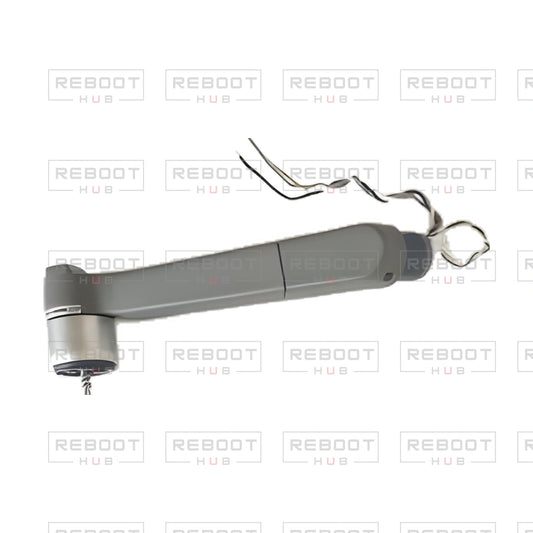

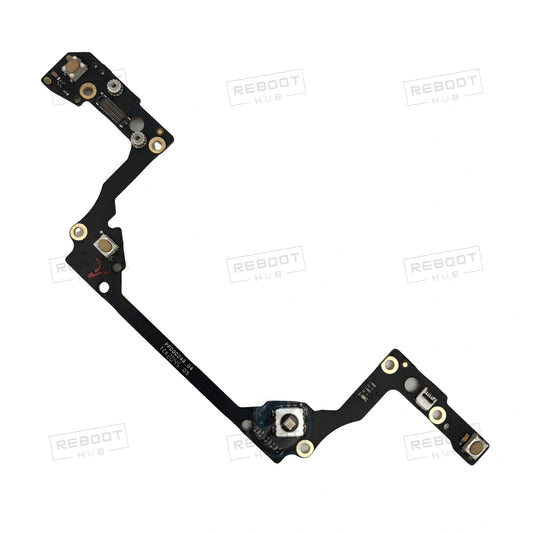

This is the full catalogue of OEM-pulled DJI drone parts at Reboot Hub. OEM-pulled means a used DJI component removed from original DJI equipment, not an aftermarket copy. Each listing is photographed as the piece you receive.
Shop DJI drones parts by type
- Boards & modules (529)
- Arms & motors (437)
- Gimbal & camera (415)
- Shells & covers (271)
- Other parts (92)
- Remote controller parts (55)
- Cables & connectors (39)
- Batteries & power (20)
Check your model first
Parts are listed per model because many look alike but do not swap between models. Start from your model's page, then match the listing title and photos to your part.
Related: DJI Mini series parts · DJI Mavic series parts · DJI remote controller parts · DJI Mini 2 parts · DJI Mavic Air 2 parts · DJI Mini 4 Pro parts · DJI Air 3 parts · DJI Flip parts
Guides: Drone Wiki · Drone repair guides · Drone repair with genuine parts
Shop genuine DJI spare parts pulled from original DJI equipment for aircraft, goggles, remote controllers and enterprise equipment. These previously installed components are not factory-new and may show cosmetic marks from removal or handling. Exact-piece photos show visible connectors, markings and attached hardware. Verified defects in the supplied part itself are covered by a 180-day limited parts warranty; incorrect matching and installation damage are excluded. Browse the live product grid below for current listings, prices and availability.
- Genuine DJI components removed from original equipment.
- Photos show the exact piece supplied and its visible details.
- Compare the exact model, component and supplied hardware before ordering.
- 180-day limited parts warranty for verified defects, subject to exclusions.
Match the exact DJI part
Compare these four identity details before ordering:
- Exact DJI model or device.
- Named assembly or component.
- Position, side, connector or printed marking, where applicable.
- Visible condition and the supplied-component details shown in the listing.
For example, DJI Mini 3 and DJI Mini 3 Pro have separately named motherboard listings. Similar model names do not establish interchangeability.
Compare component contents and condition
| Part listing | Distinguishing detail | What to match before ordering |
|---|---|---|
| DJI Mini 3 Pro GPS Module | A GPS module listing. | Compare the connector, markings and pictured contents with the component you need. |
| DJI Mini 3 Pro GPS Module with Heat Sink Bracket | The listing title explicitly includes the heat sink bracket. | Match the required assembly and inspect the pictured bracket and attachment details. |
| DJI Mini 3 Pro Rear Arm Shell with Faulty Motor Right | Right-side shell with a disclosed faulty motor. The faulty motor is part of the listing condition; the warranty does not promise to make it functional. | Confirm the right-side position and account for the disclosed faulty motor; the listing does not describe a ready-to-use motor. |
These are component-selection examples, not substitutes for one another. Shared-model wording applies only to the individual listing and does not establish universal compatibility.
Understand OEM-pulled condition
OEM-pulled DJI components have been installed before and can show normal marks from removal or handling. Small parts and accessories may use listing photos, condition notes and model-fit information rather than the evidence package supplied for eligible pre-owned drones.
The full 40-point functional inspection applies to activated pre-owned drones; it is not a blanket spare-parts inspection promise. Exact-piece photos document visible condition and supplied components, but photos alone do not establish functional test results.
Know the parts warranty
OEM-pulled and service replacement parts have a 180-day limited parts warranty for verified defects in the supplied part itself. Wrong-model ordering, incorrect matching, installation or soldering damage, modification, crash or liquid damage, misuse, and faults caused by other damaged components are excluded. Review the warranty policy for the full terms.
Cosmetic, structural and installation-sensitive parts are covered only for verified pre-existing defects or the wrong item supplied. Fitting damage, broken clips, screw damage and installation marks are excluded.
After installation, spare parts are handled only as verified warranty cases, not change-of-mind returns. A claim may require order details, photos, video, installation context, diagnostic information and return inspection before a remedy is approved.
Repair work has a separate 30-day workmanship warranty from return shipment. It covers defects in replaced parts or workmanship errors and excludes unrelated failures.
Frequently asked questions
What does OEM-pulled mean for DJI spare parts?
OEM-pulled means the component is a genuine DJI part removed from original DJI equipment. It has been installed before, is not factory-new and may show cosmetic marks from removal or handling. Listing photos show the exact piece supplied, including visible connectors, markings and attached hardware.
How do I match a DJI spare part to my exact model?
Compare the exact DJI model or device, named assembly or component, position or side, connector or printed marking where applicable, and the visible condition and supplied-component details. DJI Mini 3 and DJI Mini 3 Pro have separately named motherboard listings, so similar model names do not establish interchangeability.
What is the difference between the DJI Mini 3 Pro GPS Module listings?
The <a href="https://reboot-hub.com/products/dji-mini-3-pro-gps-module-oem-pulled">DJI Mini 3 Pro GPS Module</a> and the <a href="https://reboot-hub.com/products/dji-mini-3-pro-gps-module-with-heat-sink-bracket-oem-pulled">GPS Module with Heat Sink Bracket</a> are separate listing options; the latter title explicitly includes the bracket. Compare connectors, markings, pictured contents and the required assembly. The titles do not establish that the options are interchangeable.
What does the DJI Mini 3 Pro rear arm shell's faulty-motor description mean?
The <a href="https://reboot-hub.com/products/dji-mini-3-pro-rear-arm-shell-with-faulty-motor-right-oem-pulled">DJI Mini 3 Pro Rear Arm Shell with Faulty Motor Right</a> listing identifies a right-side shell and discloses a faulty motor. That fault is part of the listing condition; the parts warranty does not promise to make the motor functional.
What does Reboot Hub's 180-day limited parts warranty cover?
It covers verified defects in the supplied OEM-pulled or service replacement part itself. Wrong-model ordering, incorrect matching, installation or soldering damage, modification, crash or liquid damage, misuse, and faults caused by other damaged components are excluded. Cosmetic, structural and installation-sensitive parts are covered only for verified pre-existing defects or the wrong item supplied. See the <a href="https://reboot-hub.com/pages/warranty-policy">warranty policy</a> for complete terms.
Can I return a DJI spare part after installation?
Installed spare parts are handled only as verified warranty cases, not change-of-mind returns. Fitting damage, broken clips, screw damage and installation marks are excluded; cosmetic, structural and installation-sensitive parts are covered only for verified pre-existing defects or the wrong item supplied. A claim may require order details and supporting information, plus return inspection before a remedy is approved.
What should I do if I do not know which DJI component has failed?
A symptom alone does not establish which component needs replacement. Submit a <a href="https://reboot-hub.com/pages/repair-ticket">repair ticket</a> with the exact DJI model, symptoms, visible damage, crash or moisture history when relevant, and prior repair history. Review the written device identification, proposed scope, named parts where applicable, commercial terms and limitations before approving repair.
If you have identified the component, compare its model, assembly, position, connectors, markings and supplied contents, then order through the matching product listing above. If the fault is unidentified, submit a repair ticket with the exact model, symptoms, visible damage and relevant history. Review the written repair scope and terms before authorizing work.
Choose a DJI spare part by device, model and supplied configuration
This is the broad parts directory, covering aircraft, remote controllers and headsets. A useful order of selection is device, exact model, component, position and supplied pieces. The examples below show differences that remain important even when products appear next to one another in the same collection.
| Listed components | How to choose between them |
|---|---|
|
DJI Mini 3 Pro GPS Module with Heat Sink Bracket DJI Mini 3 Pro GPS Module |
The Mini 3 Pro GPS module with heat-sink bracket explicitly names attached support hardware; its separate GPS-module option must be checked independently. |
|
DJI Mavic Pro ESC Board with IMU DJI Mavic Pro ESC Board |
Mavic Pro ESC with IMU and the separate ESC board represent different module combinations. A board name is not evidence that every neighbouring sensor is included. |
|
DJI Avata 2 Upper Shell with Complete Antenna Set DJI Avata 2 Upper Shell without Antennas |
Avata 2 upper shells are offered with a complete antenna set or without antennas. Match the configuration and the original components you will retain. |
|
DJI Goggles 2 Lens Adjustment External Dial Assembly (Right) DJI RC Pro C1 Board |
A right Goggles 2 lens-adjustment mechanism and an RC Pro C1 board belong to different devices and repair layers. Do not choose by generic terms such as button, board or adjustment alone. |
Use the narrower catalog before final comparison
Series and model collections reduce unrelated results while retaining the exact item identity. After choosing the aircraft or controller, distinguish a whole assembly from a frame, cable, cover, bracket or fastener. Confirm the position and unit on the product page; a pair or set is not equivalent to one side.
Read donor condition and exclusions as part of the specification
Faulty-motor shells, lens-free gimbal arms, bare boards and hardware-free guards have different limits from combined assemblies. OEM-pulled describes origin and used condition; it does not turn every listed component into a working complete assembly. If the failed part is still unidentified, establish the repair scope before choosing electronics.
Parts directory: finding the correct purchase scope
What should I identify before comparing parts across this directory?
Identify the exact device and model, the component’s location, any hardware revision and the supplied pieces. Then compare the individual photographs and connections.
Does an aircraft-family or broad parts collection establish compatibility?
No. Collection membership is a browsing route. The exact model application and physical configuration on the product page remain the compatibility reference.
Explore the aircraft and device Wiki
Choose a model below for its Drone Wiki information and repair reference. Use the exact model and configuration on each product listing to establish part compatibility.
Parts finder
Find DJI parts by aircraft family
Choose the aircraft family first, then verify the exact model, component and connector on the product page.